
Route planning, dispatch & tracking softwareOne platform, from the phone call to the paid invoice.
Most delivery businesses run on four or five systems that each hold a piece of the truth. Every seam is a place for the numbers to disagree. Delivery Genius is built as one system on purpose — and it starts with a free X-Ray of the routes you run today.
Start with a grade. Free.
Route X-Ray reads the stop list you run today and grades it A–F in seconds — duplicate stops, uneven routes, avoidable miles and window clashes. It runs entirely in your browser; your file never leaves your computer.
The full Route X-Ray goes further: it measures every route on real roads, prices what a better order and the right truck are worth in miles, hours and dollars, and can turn the result into your live routes in one step.
Your routes: B
Sample report · 4 routes · 62 stops
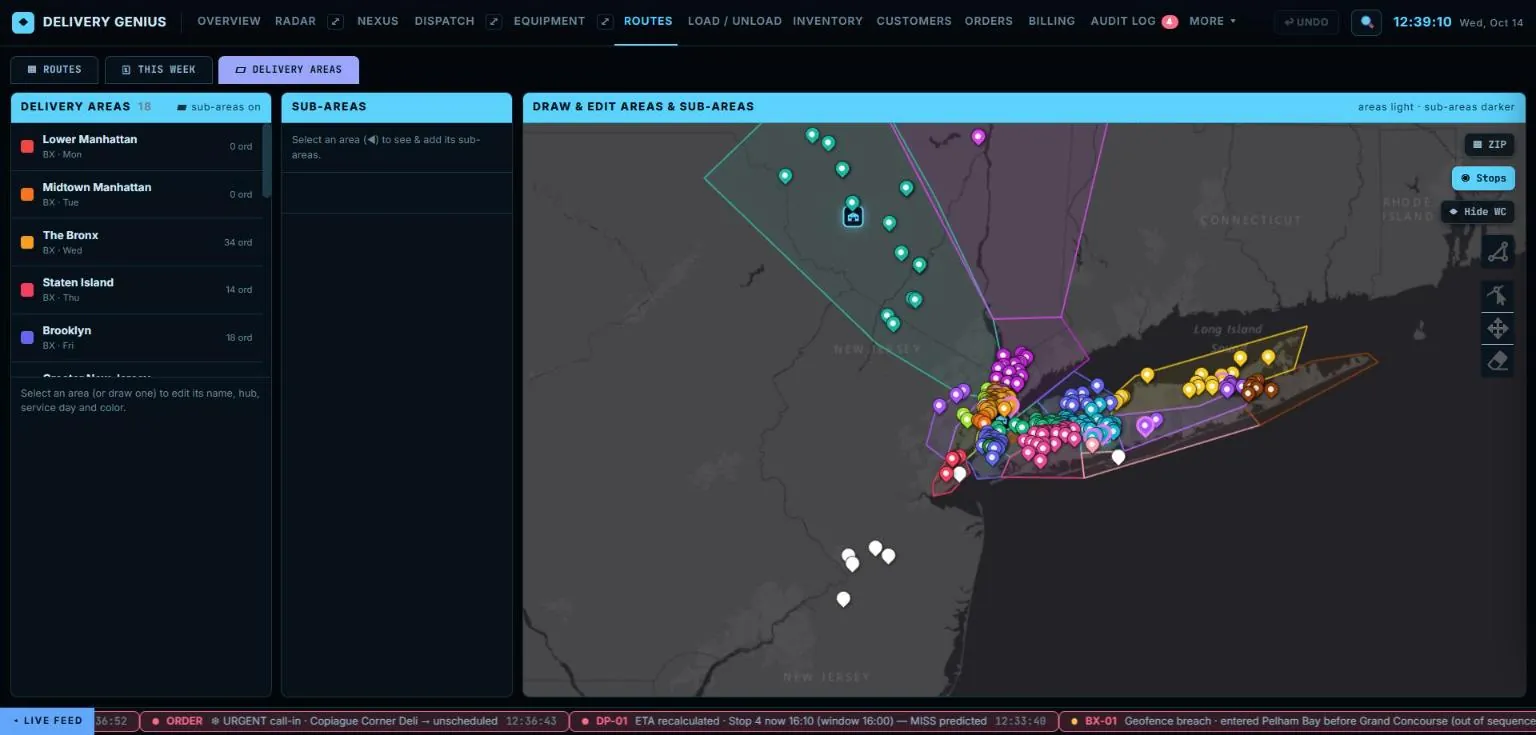
Draw the areas once. Everything downstream uses them.
Delivery areas are drawn as real shapes on a map — the outline your business actually serves, not a circle around a pin. Assign each one a warehouse, a service day and a colour.
From then on they do the work: a new order tags itself to the area it falls inside, lands on the right day for the right hub, and shows up where the dispatcher expects it.
Routes on real roads, anchored to real warehouses.
Routes start and end at the hub that actually loads them, and follow the road network rather than straight lines — because a straight line doesn't tell a dispatcher whether the 2 p.m. window is reachable.
Multiple warehouses are the normal case, not an upgrade: three depots across a hundred miles is one operation, with each route belonging to the building it leaves from.
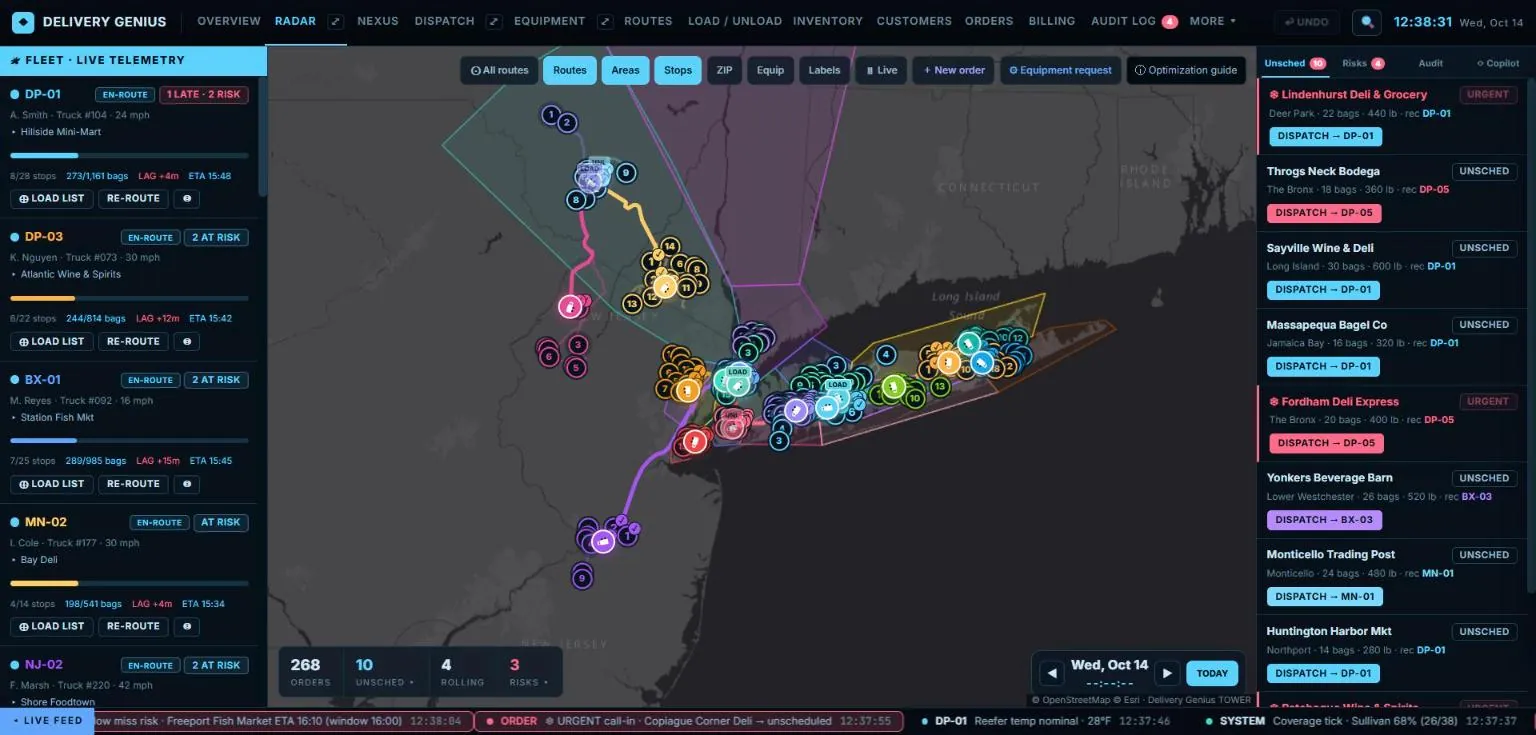
A board you work on, and a map you watch.
A dispatcher does two jobs and wants two screens. One is a working surface — moving stops, swapping crews, fixing the plan. The other is vigilance — watching the day run and noticing the moment it stops going to plan.
The dispatch board
Drag an unscheduled order onto a route. Move a stop between lanes. Swap the driver or the truck from a right-click. Every change can be undone — nothing on a working board should be a one-way door.
The live map
Trucks, territories and stops clearing as the day runs, with alerts when a time window is about to be missed or a truck leaves the area it should be in. Both screens stay in step.
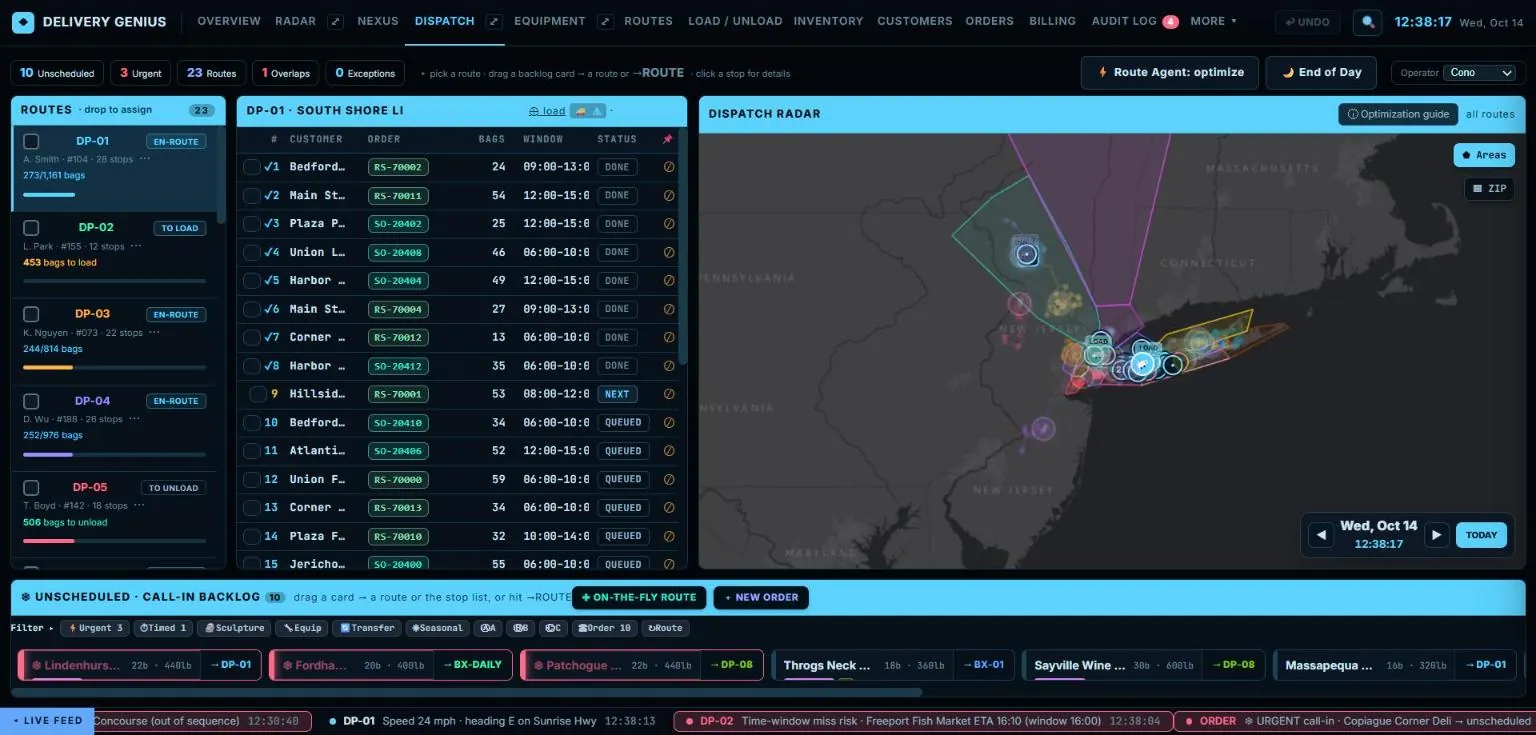
Every truck, live.
RADAR puts the whole fleet on one map: each route's progress, speed, lag and ETA, the stops clearing as the day runs, and the urgent and unscheduled orders waiting — each with a recommended route to drop it on.
- Live telemetry — position, speed and progress for every truck.
- Risk before it happens — late and at-risk stops flagged while there is still time.
- Geofence alerts — a truck outside its area, or a stop out of sequence.
- Replay — play back yesterday on the map.
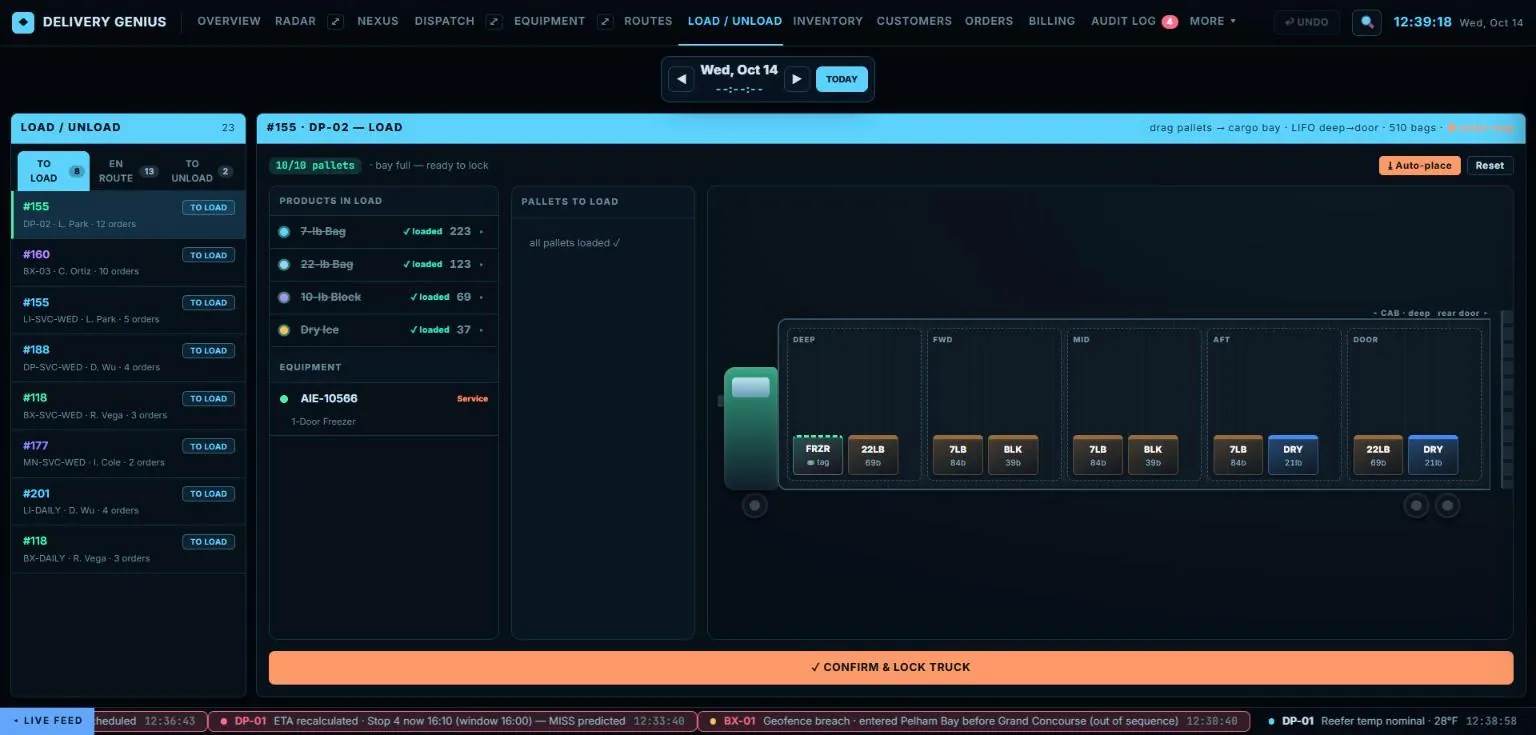
Load the truck in stop order.
The warehouse sees exactly what goes on each truck — products, quantities and equipment — and places the pallets deep-to-door so the first stop comes off first. Nothing leaves until every pallet is in and the truck is locked.
- Load lists per route — generated from the day's orders.
- Pallet placement — drag or auto-place, LIFO from cab to door.
- Equipment on board — freezers, coolers and brewers riding along.
- Unload & returns — what came back, checked in at the dock.
The new driver app, billing and customer portal.
We are redesigning all three from the ground up — the driver app on the phone drivers already carry, invoicing raised by the delivery itself, and a portal where customers reorder and pay. Previews are on the way.
Take the 60-second tour.
Real screens from the Delivery Genius command center, running on demo data — from the morning overview to the truck leaving the dock.
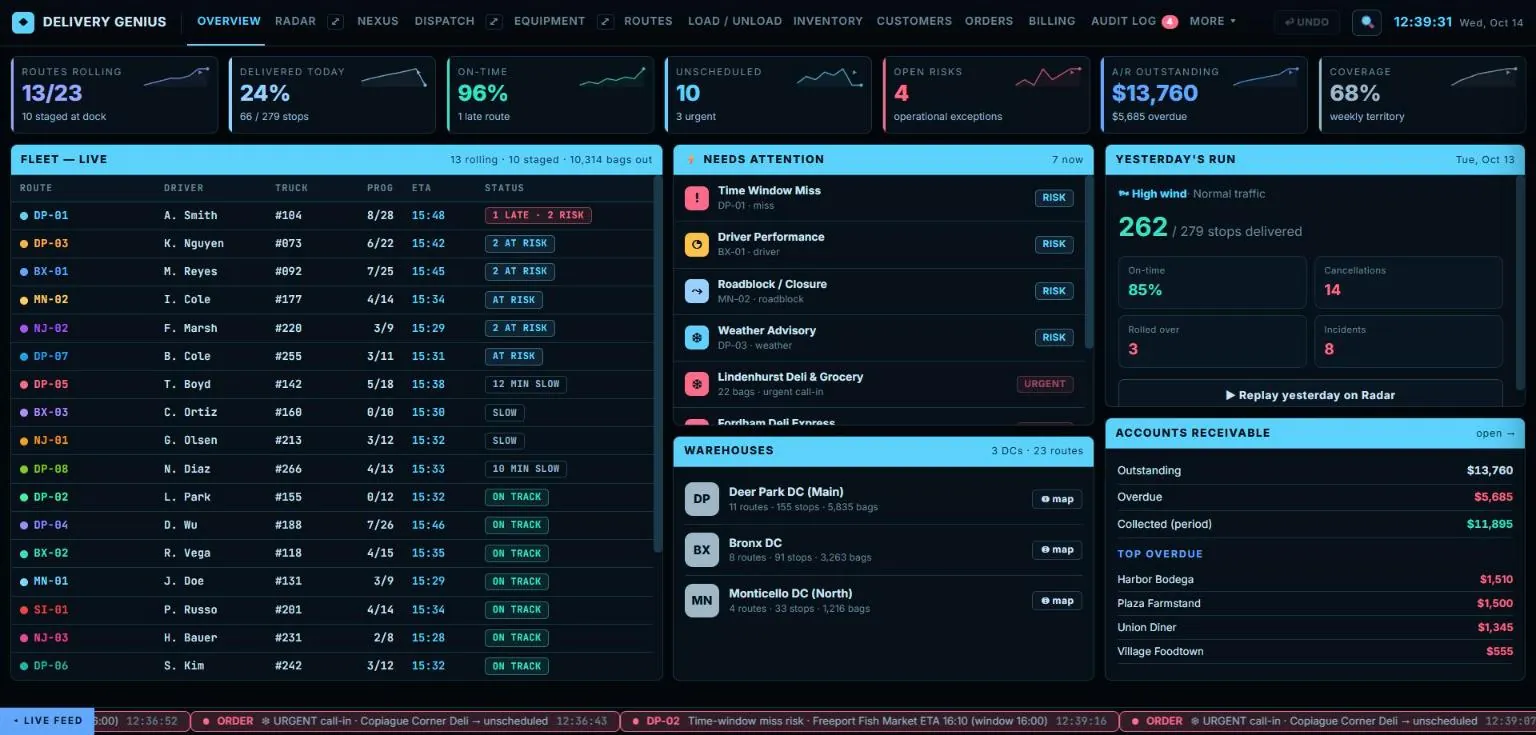
The whole day on one screen. Routes rolling, on-time rate, every truck's progress and ETA, what needs attention right now, each warehouse, and the money still outstanding.
RADAR — every truck, live. Speed, progress, lag and ETA per route on the left; urgent and unscheduled orders on the right with a recommended route for each; the whole territory in between.
Drag, drop, done. Pick a route, see every stop with its window and status, and drag call-in orders from the backlog straight onto a route. Everything can be undone.
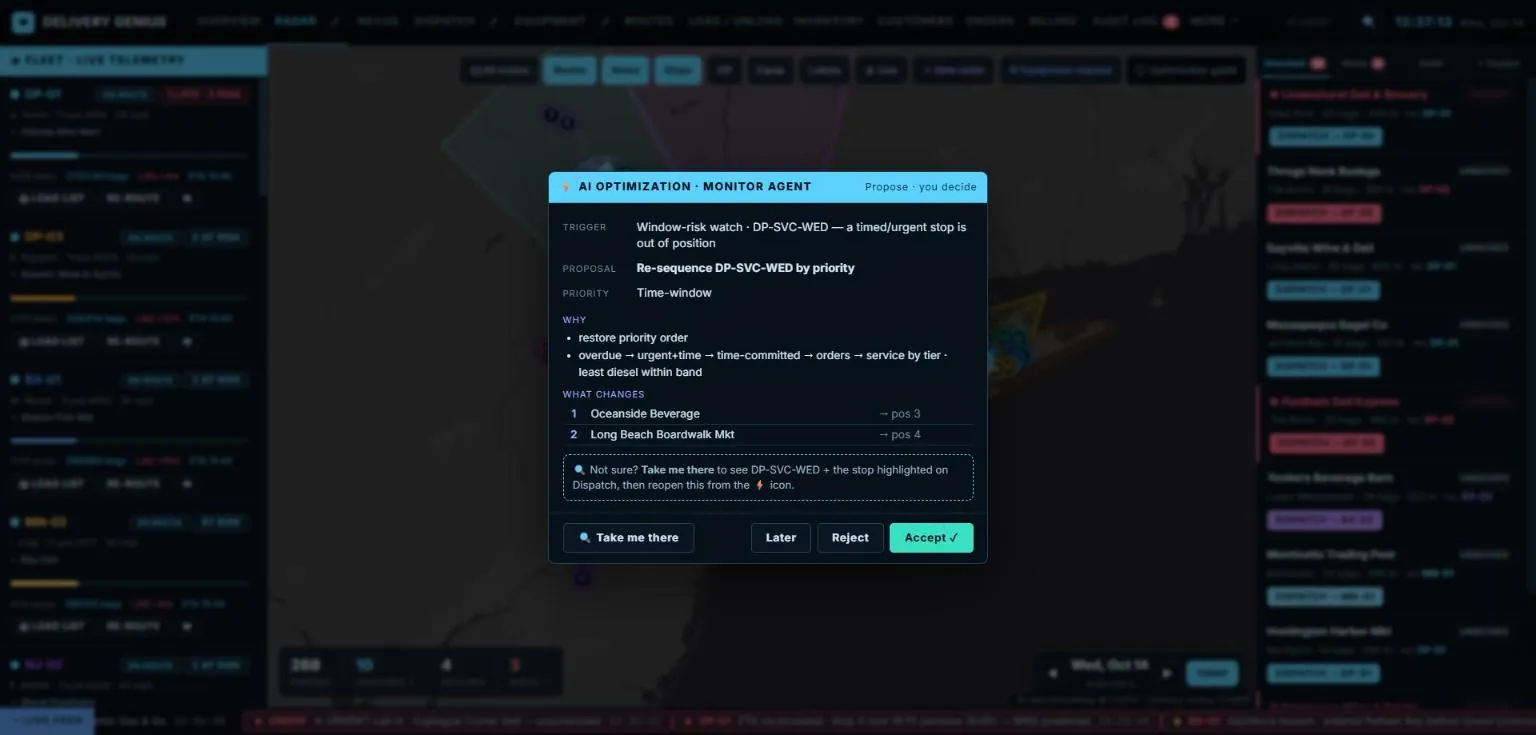
It proposes. You decide. The monitor agent spots a timed stop out of position, explains why, shows exactly what changes — and waits for a human to accept, reject or come back later.
Load the truck in stop order. Pallets placed deep-to-door so the first stop comes off first, equipment riding along, and the truck locked only when every pallet is in.
Draw your territory once. Delivery areas are real shapes, not circles — each with its hub, service day and colour. New orders drop into the right area automatically.
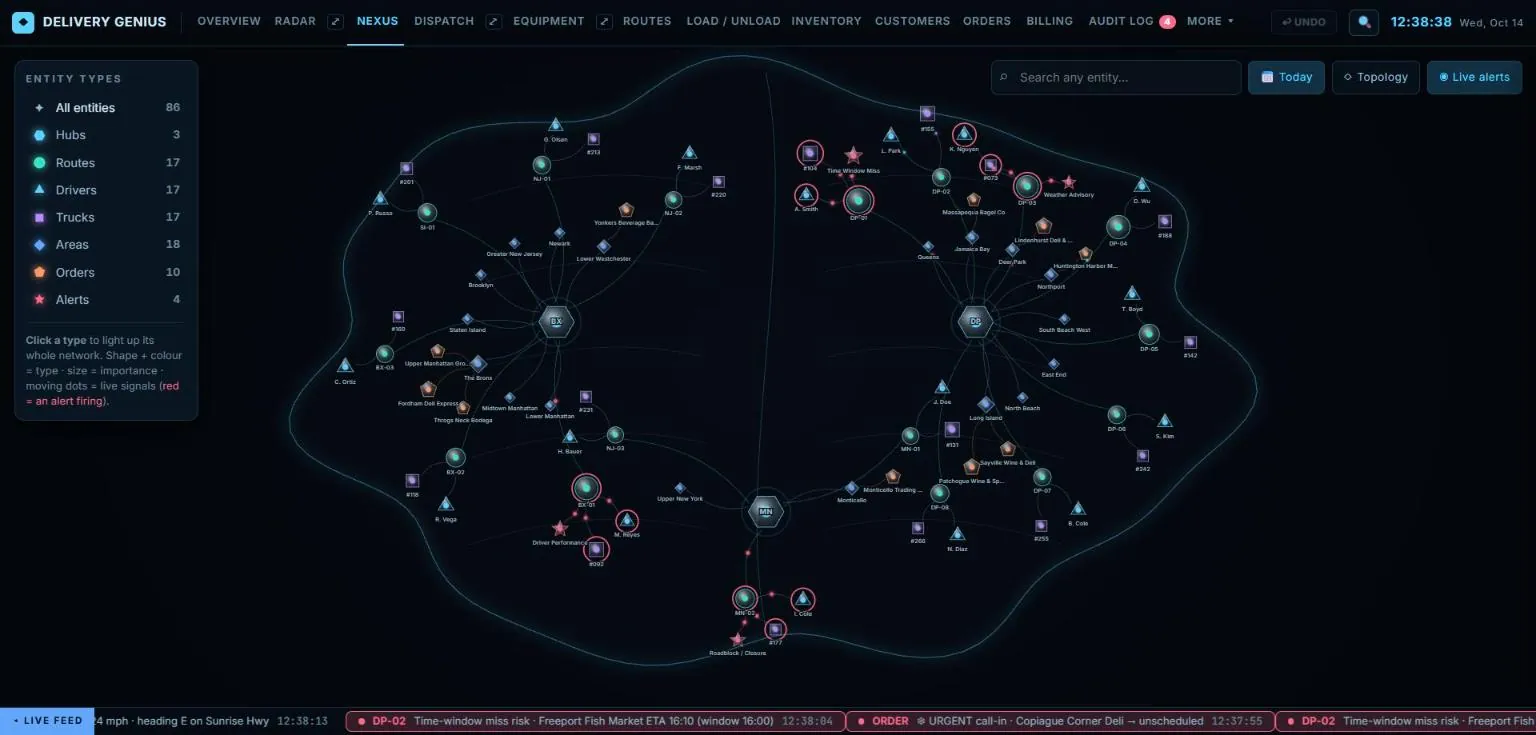
Nexus — see how it all connects. Every hub, route, driver, truck, area, order and alert as one live network. Click anything to light up everything it touches. Nexus add-on →
The new driver app, billing and customer portal are being redesigned — previews coming soon.
Product screens shown with demo data.
The delivery is the invoice.
Completing a stop raises the invoice from what was actually delivered, and a payment taken at the door settles against it immediately — so “what is owed, and by whom” has one answer at any hour.
Invoices that match reality
Short-delivered means short-billed. What the driver recorded is what the customer is charged — no re-typing.
Receivables in one place
Who owes what, how old it is, and which accounts are worth a call this morning — including cash a driver is still carrying.
Cost per unit, honestly
Product, labour, fuel and equipment together, so the cost of serving a route is a number rather than a feeling.
It proposes. You decide.
Automation earns its place spotting that two half-empty routes should be one, that a sequence no longer makes sense after three cancellations, or that an account's pattern has quietly changed.
What we won't build is software that rearranges a dispatcher's day without asking. The default is a proposal with its reasoning attached, waiting for a human yes — and an operator who wants it to act alone can turn that on, deliberately.
Same platform. Three different businesses.
The route model, the units, the equipment on site and the money mechanics differ. We build the differences in as configuration, so each business gets software that speaks its own language.
Ice delivery
An ice route is a sweep: a territory covered across the week, where the driver reads the box and decides what the account needs. Demand moves with the weather, and the freezer on the customer's floor is your asset in someone else's building.
- Sweep routes — a territory served across a cycle, not a fixed list of pre-booked stops.
- Freezers and merchandisers — what you own, where it is, who services it.
- Fill at the box — what actually went in is what gets billed.
- Seasonal swing — a July Saturday is not a February Tuesday.
- Cost per bag — a number you can price against.
Water delivery
A water route is a schedule: arrive before the customer notices they're low. Bottles and coolers go out on deposit and have to come back, and the empties are as much a part of the transaction as the full ones.
- Standing frequencies — weekly, fortnightly, monthly, with the route built from the commitment.
- Deposits that reconcile — what went out, what came back, what's still owed.
- Coolers and equipment — installs, exchanges, service calls and returns on the same stop.
- Empties on the same ticket — recorded at the door, not guessed at month end.
Coffee service
A coffee route is a relationship with a break room. The brewer belongs to you, the consumables run out on a rhythm, and the visit that refills the cupboard is also the visit that fixes the machine.
- Consumables on a frequency — coffee, cups, lids and filters planned per account.
- Brewers on site — what you placed, where, and when it was last serviced.
- Service on the same visit — a descale or repair recorded against the machine.
- Par levels per break room — the route notices before the account does.
A web page can describe it. A demo on your territory settles it.
Bring your territory and a week of stops. Half an hour is usually enough to tell whether this fits the way you actually work.